
AI development is moving incredibly fast. Every week a new model appears with more possibilities: higher quality, new styles, or completely new features. But how can you test all these innovations yourself, without relying on expensive cloud services? The answer could be: ComfyUI.
What is ComfyUI?
ComfyUI is a powerful and modular visual AI engine that works with stable diffusion workflows. Instead of a closed interface, you get a graph- and node-based canvas. With this, you can build your own AI pipelines by connecting, branching, and adjusting nodes. This gives you maximum freedom to create exactly the workflow you need.
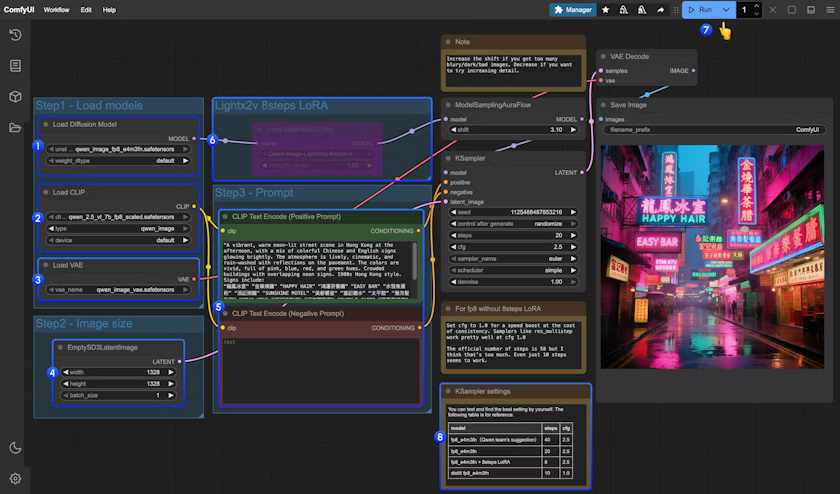
Test the latest models yourself
Because AI models evolve so quickly, you will of course want to try them out right away. If you have a PC with sufficient hardware — for example an NVIDIA RTX graphics card with at least 8GB of VRAM — you can install ComfyUI locally. This allows you to run the latest models directly on your own system, without queues or per-prompt costs.
Save, share, and reuse workflows
What makes ComfyUI especially powerful is that you can not only create workflows, but also easily save and share them. Files such as images, videos, or 3D models contain metadata that allows the full workflow to be automatically rebuilt as soon as you drop them into ComfyUI. This is ideal for collaboration, learning from others, or simply experimenting again quickly.
Open-source and cross-platform
ComfyUI is completely free and open-source, and available for Windows, Linux, and macOS. Whether you are a creative maker who wants to experiment visually, or a developer who wants to dive deeper technically: the tool adapts to your workflow.
Why choose ComfyUI?
- Flexible and modular: build your own AI workflows.
- Future-proof: easily test the latest models.
- Run locally: no cloud costs or dependencies.
- Community-driven: share, remix, and reuse workflows.
In short: if you want to truly take control of AI creation, and explore all the new models that appear every week, then ComfyUI is the engine to get started with.
👉 Download ComfyUI from the official website: https://www.comfy.org/
Related Articles
 Overview Map: Open-Source AI Video & Image Models (January 2026)
  Simple script to use ChatGPT on your own files with LangChain
 - The Fear of AI in Software Development: Risks of Code Leakage and Privacy Loss
 How to Install a Local LLM on Ubuntu 24.10 with LM Studio?
  Run a Large Language Model (LLM) locally with Ollama